

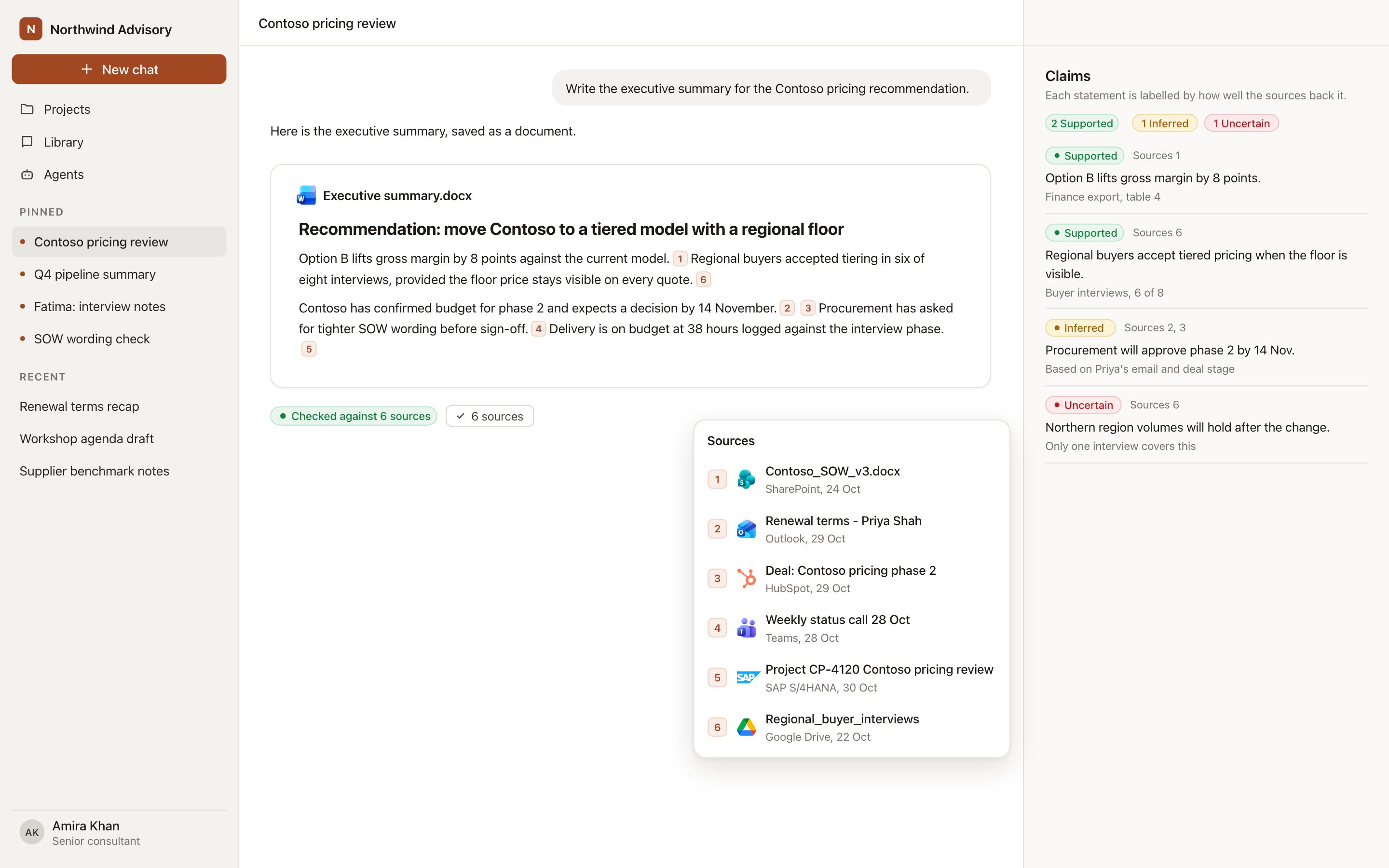
The Sources list and the claims panel beside a reply.
The Sources button
Under every reply and deliverable that used material, the Sources button lists each unique source once, with its logo or favicon. Open it to see:- The name of the file, email, meeting, record or web page.
- A short excerpt of what Hebno used.
- A link that opens the original in its own system or on the web.
During a research run, the Steps trace shows the same items as chips, one per file or record, grouped by system, for example Reviewing email or Checking context in SharePoint. A chip shows Cited as [n] when a document cites it, and Findings backed counts how many findings rest on a source.
Citations
Documents contain numbered citations in the text, such as [3]. Each number points to an entry in Sources. When you export a document, a Sources section is appended so the reader can follow every number. Decks do not include citations on slides. Their evidence is in the conversation’s Sources list, and you can check a deck against its sources. Documents come from the knowledge index, which updates from the source within minutes. Records, email and calendars are read live with your own permissions, so a source reflects the system at that moment. The excerpt it used is stored with the conversation, so the evidence for a deliverable remains available later.Claims
A research run breaks its findings into claims and labels each one.
Review Inferred and Uncertain claims first. Saying “likely” or “we estimate” in the client-facing text is a reviewer’s decision, so make it deliberately.
Verification state
Documents and decks show a shield that states how far they have been checked.
Select Verify against sources when a deliverable is unchecked or edited, or Check again when it is checked. Hebno runs a revision pass that compares the deliverable with its sources and updates the state. See Verify against sources.
Blocked sources
Admins can block web sources by domain (including subdomains) or by pattern, for examplereddit.com/r/* or *.blogspot.com, under Admin → Organisation brain → Blocked sources. Web search never returns or cites a blocked source. The rules apply to web search only. They do not affect the library, connected systems or files you upload.
Reviewing before delivery
- Open Sources and confirm the important figures come from the right system.
- Read the Inferred and Uncertain claims and resolve each.
- Follow two or three citations to the originals.
- Run Verify against sources after your last edit.
- Save the deliverable, or export it with its Sources section.
Next steps
Verify against sources
Check a deliverable against what it cites.
Research runs
How a run collects and weighs evidence.