

At a glance
Before you start
You need a Google account that organised or joined the meeting. Transcripts and Gemini notes exist only when the host turned them on during the meeting and the Workspace allows them. Personal Google accounts may not have transcripts. A super admin controls these settings. See Google Workspace admin.Permissions
Connect Google Meet
1
Open Connections
Go to Settings → Connections and find Google Meet under Communication. Or type
/ in the composer, choose Google Meet and select Connect.2
Approve access
Select Connect (or Grant access if you already connected another Google product), sign in to Google and approve reading your meetings.
Enable for the organisation
Meet permissions are sensitive, so a Workspace super admin often approves them for the domain. An owner or admin can select Enable for the organisation on the Google Meet card under Admin → Connectors → Catalogue. Members then connect without a Google consent screen, and still see only meetings they organised or joined. See Google Workspace admin.What Hebno reads
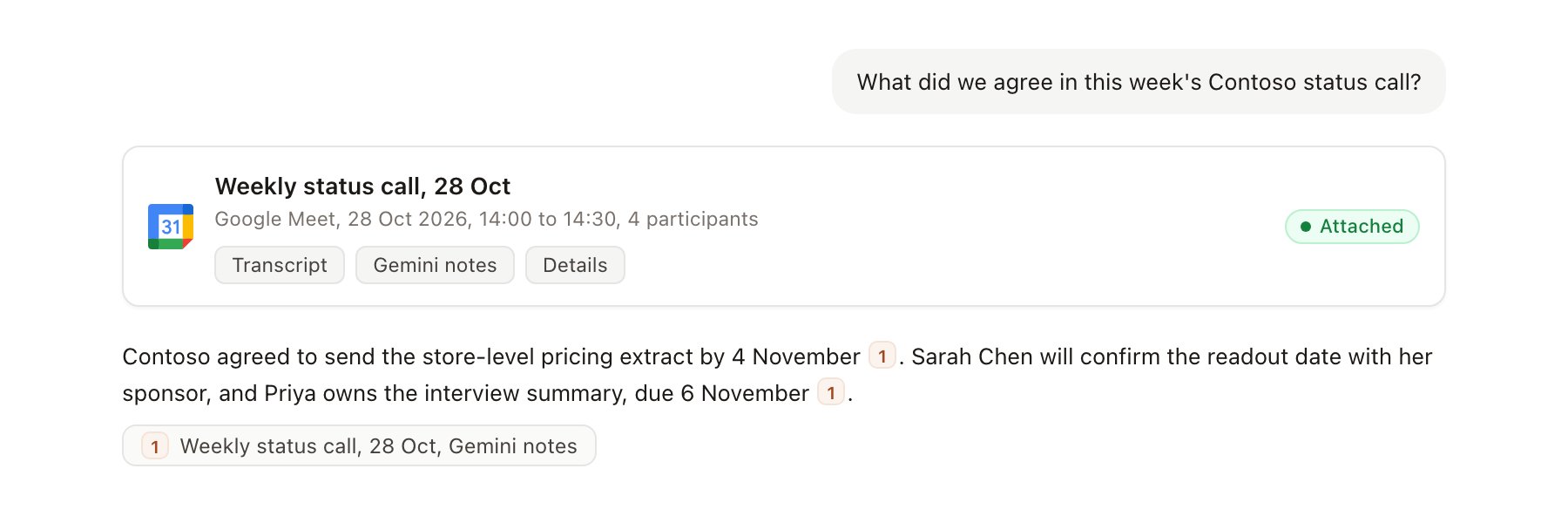
A Meet meeting record attached to a chat.
Google deletes transcript entries 30 days after a conference ends. Attach or ask about a transcript within 30 days. Gemini notes are stored in Drive under your Drive retention rules.
What Hebno writes
Hebno does not write to Google Meet. It does not start, join, record, transcribe or end meetings. To schedule a follow-up with a Meet link, use Google Calendar.Use Google Meet in chat
-
Attach: open the + menu, choose Sources → Google Meet, pick a meeting, then pick the transcript, notes or full record. Or type
/and choose Google Meet. -
Ask: name the client, person or date. For example:
Summarise the Contoso stakeholder workshop and list every decision with who made it.
Pull the action items from Tuesday’s Contoso call and draft the follow-up email.
What objections did Contoso raise about the timeline across our last three calls?
- Research runs show a Reviewing Google Meet step, with a chip for each meeting and the source used.
- Agents can read recent meetings on a schedule, for example a Monday digest of last week’s client calls with action items. Writes an agent proposes elsewhere appear in agent approvals for review.